SYS010 Reloaded: The new malvertising campaign targeting Meta Business Accounts


Bitdefender Labs has uncovered SYS010, a new malvertising campaign that uses Meta ads promoting free animated wallpaper apps to target Meta Business accounts.
The campaign uses paid ads to direct users to install malicious browser extensions that steal browser cookies, collect Meta Business data, read emails and, in some cases, delete security alerts.
Key findings:
- Ongoing attack: Bitdefender Labs identified the first malicious SYS010 advertisement on October 16, 2026.
- A new generation of SYS01: SYS010 retains elements of the SYS01 delivery chain documented by Bitdefender Labs in 2024, but substantially rebuilds the loader, browser-extension payload and account-theft capabilities.
- Global activity: Bitdefender observed requests to SYS010 infrastructure from countries across Asia, Europe, North America, Africa and South America. The highest volume of observed requests came from the Philippines, Thailand, Bangladesh, Poland, Mexico, Algeria, Belgium, Mongolia and the United States.
- A convincing decoy: The ads promote free animated wallpaper applications for Windows. Victims download a working wallpaper app that also installs malicious components in the background.
- No activity observed from Vietnam: Bitdefender telemetry did not record SYS010-related activity from Vietnam. This is consistent with, but does not prove, the possibility that Vietnamese-speaking individuals may be operating the campaign while targeting people elsewhere.
- From PHP Infostealer to PHP loader: The PHP samples no longer steal data. They enroll the victim with the command and control (C2) server and wait for tasks, and the next stages are delivered only to the victims that the server selects.
- The Infostealer moved into the browser: The final payload is a malicious browser extension for Chrome, Edge and Firefox that can steal browser cookies and collect data from Facebook ad accounts, Business Managers and Pages. The Firefox version carries a valid Mozilla signature.
- Reading and deleting emails: The Chrome version of the extension adds a module that reads the most recent messages from the Gmail and Outlook accounts open in the browser and permanently deletes messages selected by the attackers, which can be used to hide security alerts from the victim.
- SYS010 abuses browser and device-management features intended for legitimate organizations, making the malicious extensions difficult for victims to remove.
- Resilient infrastructure: The loader and the extension each have their own C2 domains and can obtain new ones from authenticated messages hosted on Telegram and Cloudflare R2 (and, for the loader, on Google Docs and Google Sites). During our analysis, we observed new domains being published for both of them.
- Small businesses and creators who use Meta Pages, professional accounts or advertising tools should be especially careful with software downloads promoted through social media ads.
A new version of SYS01
We chose the name SYS010 because 010 represents the number two in binary: the second major version of the SYS01 campaign identified by Bitdefender Labs.
The operation retains the same broad goal of stealing access to Facebook and Meta Business accounts, but its delivery chain and capabilities have changed significantly. For small businesses and creators, a compromise can mean lost access to social accounts, advertising budgets, customer messages and trusted brand channels.
Deep dive into the malvertising campaign
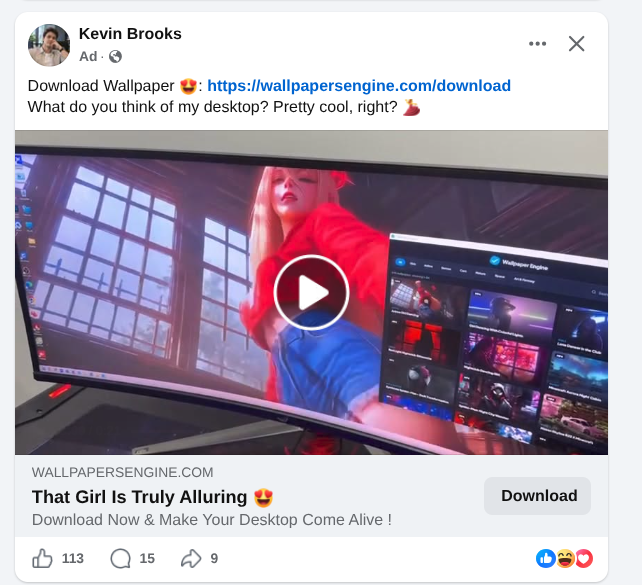
The ads observed by Bitdefender Labs promote free “live wallpaper” software for Windows. One advertisement used a short video of an animated desktop wallpaper alongside a suggestive headline, then directed people to wallpapersengine[.]com, a domain designed to resemble the name of the legitimate Wallpaper Engine application.
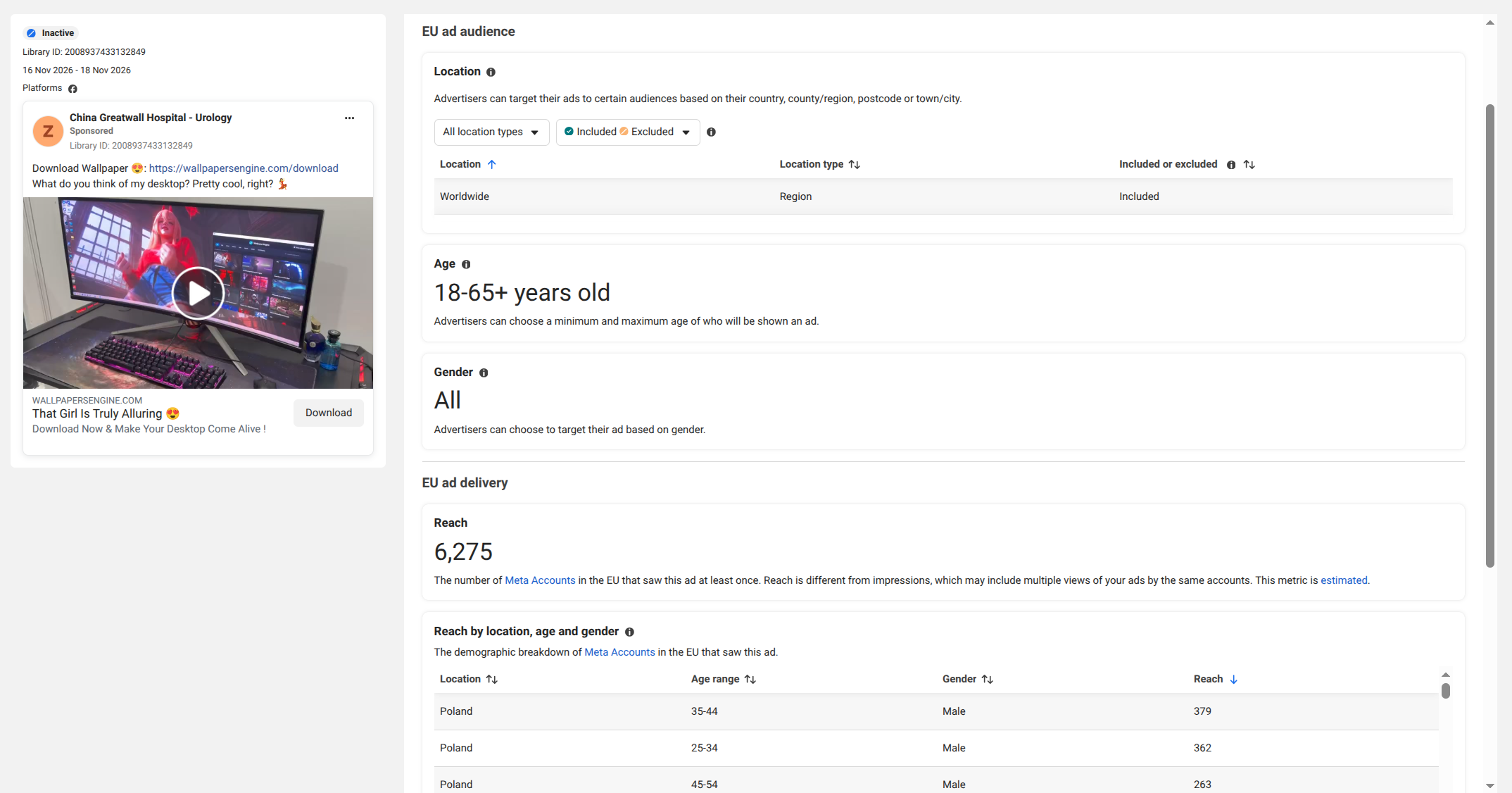
So far, researchers have observed ads impersonating Wallpaper Engine and Live Wallpapers. One advertisement reached more than 6,000 people, and dozens of ads have been created since October.
From the first ad to global activity
Bitdefender Labs identified the first malicious SYS010 advertisement on October 16, 2026. Since then, Bitdefender has observed requests from devices in countries across Asia, Europe, North America, Africa and South America. The highest volume of observed requests came from the Philippines, Thailand, Bangladesh, Poland, Mexico, Algeria, Belgium, Mongolia and the United States.
The wider list of countries includes Egypt, Morocco, Serbia, Peru, Romania, Greece, the Netherlands, Madagascar, Zimbabwe, Laos, France, Cambodia, Brazil, Malaysia, Nepal, Italy, Saudi Arabia, Tunisia, Spain and Pakistan.
Notably, Bitdefender telemetry did not record SYS010-related activity from Vietnam. This is consistent with the assessment that the campaign may be operated by Vietnamese-speaking individuals while primarily targeting people in other regions. However, the absence of telemetry from one country does not establish attribution on its own.
Distribution tactics of the malvertising campaign
Unlike the SYS01 campaign documented in 2024, which often pointed victims to MediaFire links, SYS010 ads lead to dedicated websites that directly download a roughly 74 MB ZIP archive.
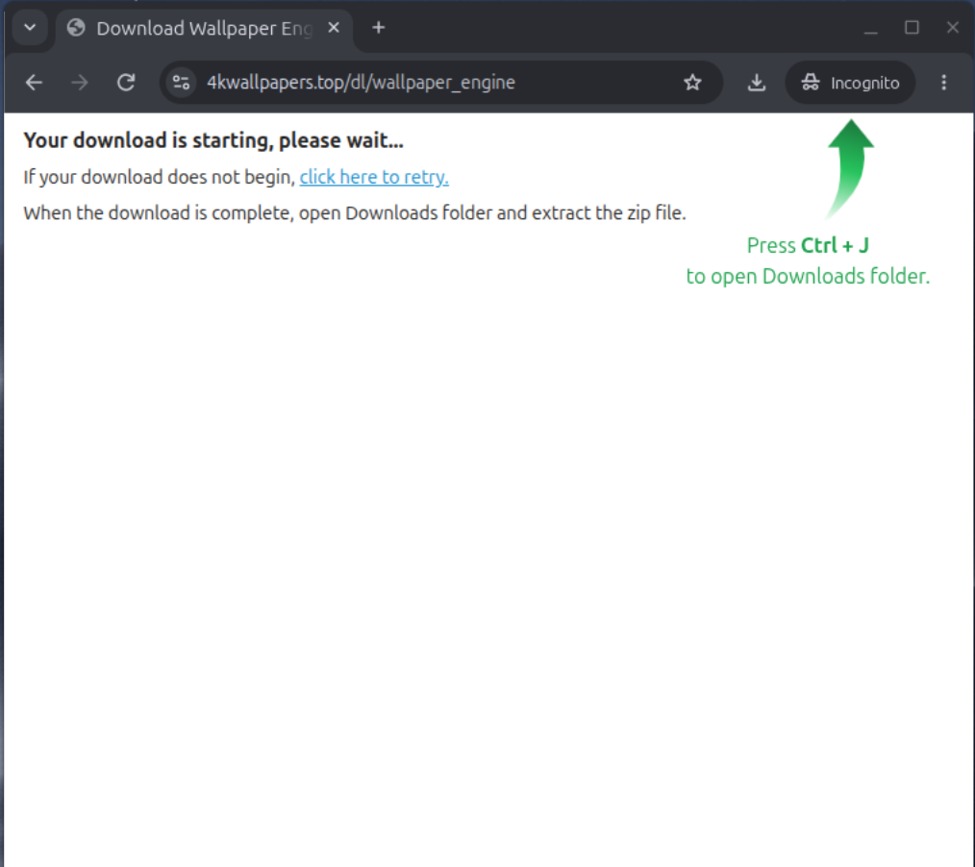
The archive contains an application named Wallpaper Engine.exe. There is no traditional installation process: the victim unpacks the archive and runs Wallpaper Engine.exe.
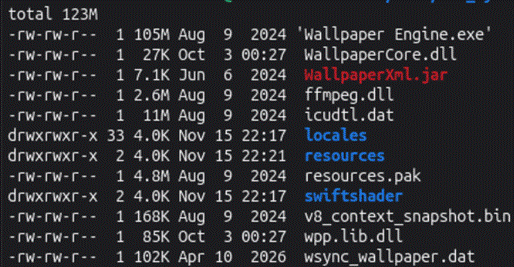
While the structure of the extracted archive looks like that of any Electron application, a closer look reveals several interesting facts:
- The main executable is not malicious. It is the unmodified, digitally signed binary of the MeisterTask desktop application (version 3.0.10, built on Electron 11.0.3), renamed to Wallpaper Engine.exe. Because this Electron version doesn’t verify the integrity of its resources, it loads any app.asar file placed in its resources folder;
- resources\app.asar contains the application of the attackers: a main.cjs file with obfuscated code, a preload.js file and the user interface;
- resources\temp is another archive that is password protected;
- resources\7zr.exe is a legitimate standalone version of 7zip (version 26.02) that carries the digital signature of Docker Inc;
- resources\static is a small encrypted file that holds the tag of the campaign (for example, wallpaper_engine_6);
In 2024, the malware ran in the background while a decoy app appeared to function normally. This time the decoy is the real deal: a working wallpaper browser that downloads its catalog from a server controlled by the attackers (best-pc-softs[.]top), making it difficult for the victim to realize they've been compromised.
Upon deobfuscating the JavaScript file, it becomes apparent that the standalone 7zip is executed directly, without the intermediary PowerShell scripts, enabling the extraction of the password-protected archive into a folder under %LOCALAPPDATA%:
7zr.exe x resources\temp -o%LOCALAPPDATA%\Quorion -p<password> -y -bd
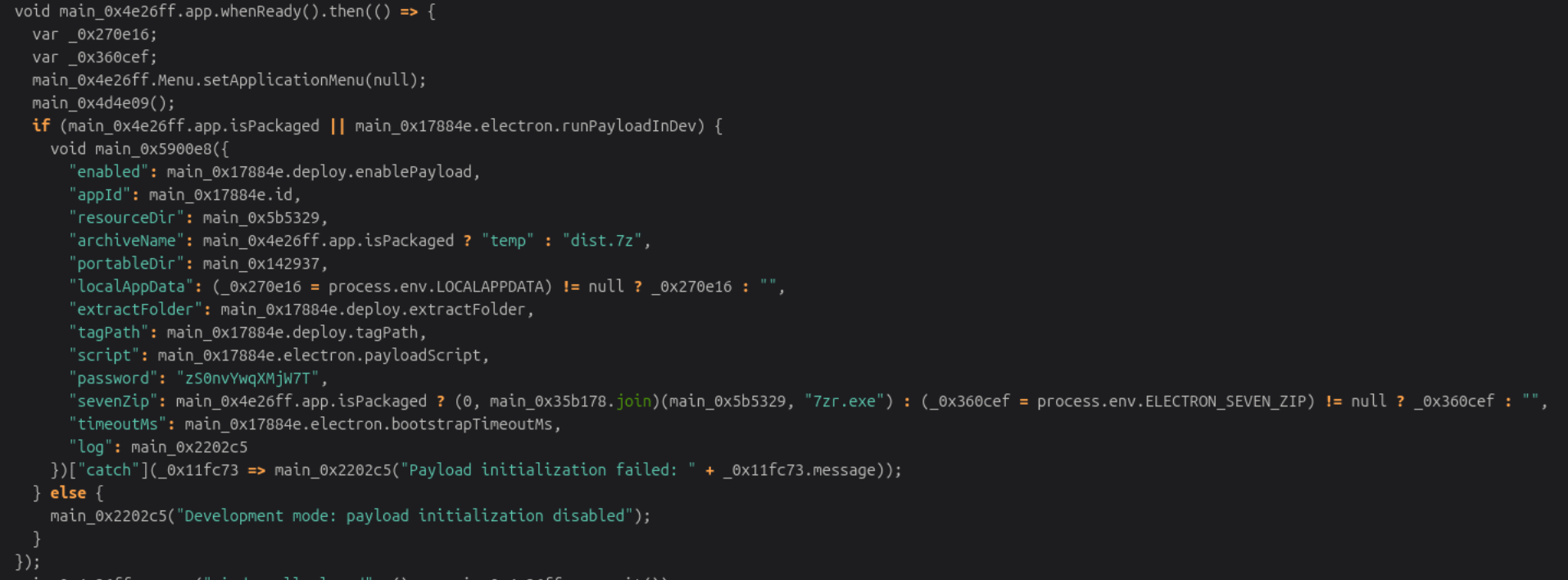
The name of the folder and the password of the archive are different in every build we analyzed (Resonimur, Preciona and Quorion). Finally, the script triggers the start of another process using a PHP interpreter and a PHP script, which were part of the password-protected archive that was extracted before:
php.exe bootstrap.php
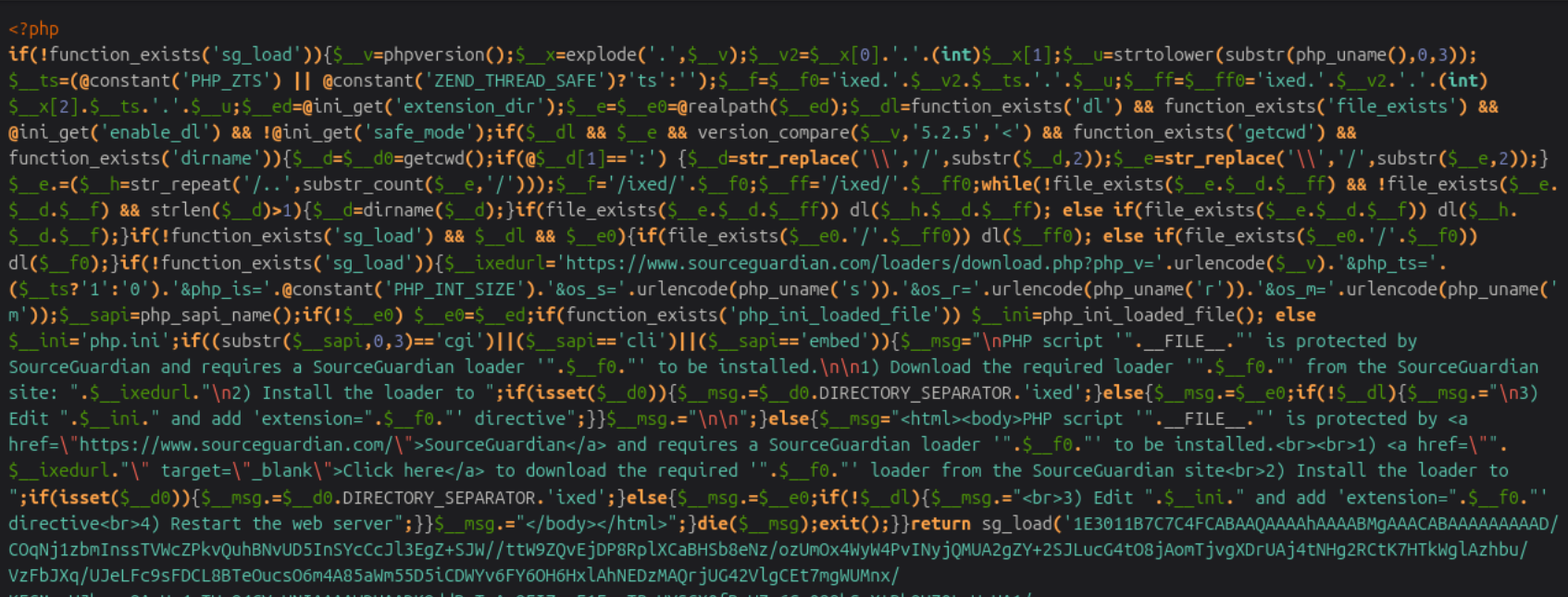
The archive contains a complete PHP 7.2 runtime (version 7.2.23) and two malicious samples: bootstrap.php and base.php. The PHP samples are no longer encoded using the IonCube Loader. They are now protected with SourceGuardian, and the component needed to run them is hidden in plain sight as ext\php_pdo.win. Interestingly, an IonCube loader (version 12.0.4, with a file date of May 2023) is still shipped in the same folder, renamed to php_phpdbg.dll, and is still loaded by php.ini, although none of the files needs it.
The first executed script is bootstrap.php. This script enables persistence of the malware through the Task Scheduler by creating two tasks:
• StandardUpdate-<SID>-<8 hex characters> – At every logon of the user that executed the malware (with a delay of one minute), run both the bootstrap.php script (re-ensuring persistence in case it is somehow altered) and base.php.
• TaskService-<SID>-<8 hex characters> – Ensures the periodic run of the PHP loader through the command wscript.exe php.vbs base.php. This task is executed every three minutes.

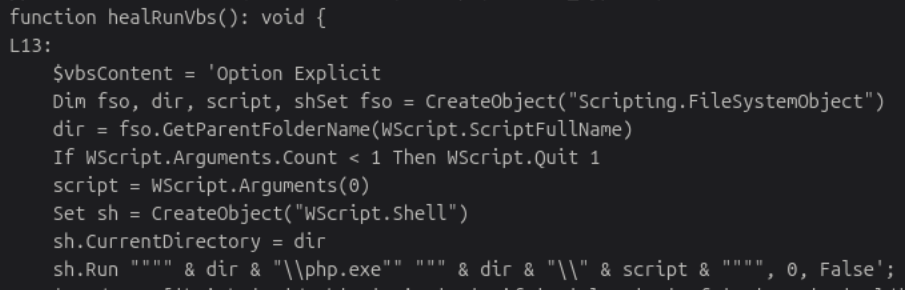
The names of the tasks end with the SID of the user and the first 8 characters of the SHA-1 hash of the path of the installation folder. The rhc.exe helper that was used in 2024 to hide the console window was replaced by a small VBScript launcher (php.vbs), which is rewritten with a random first line every time bootstrap.php runs, so that its hash is never the same.
A loader instead of an infostealer
In 2024, analyzing the php.exe index.php process revealed the infostealer itself. The new base.php is a different piece of software: a small bot (under the name: version 1.0.1) that contains no data theft code at all. Every three minutes, it goes through the same steps:
- It looks for a working C2 server, trying the last one that worked and then three hardcoded domains;
- It enrolls the machine, if it has not done so already, by sending a random machine ID, the host name and Windows version of the computer, a hardcoded secret and the tag of the campaign. The server answers with a token that is used in all further requests;
- It asks the server for tasks;
- It downloads and executes the PHP files it is instructed to, then reports the result.
The loader communicates with the C2 domains by simple HTTPS calls. For example, the C2 can be checked if it is up by doing an HTTP call the following way:
https://{C2_DOMAIN}/api/ping
The enrollment is done through /api/enroll, tasks are requested through /api/v1/state and results are sent to /api/v1/result.
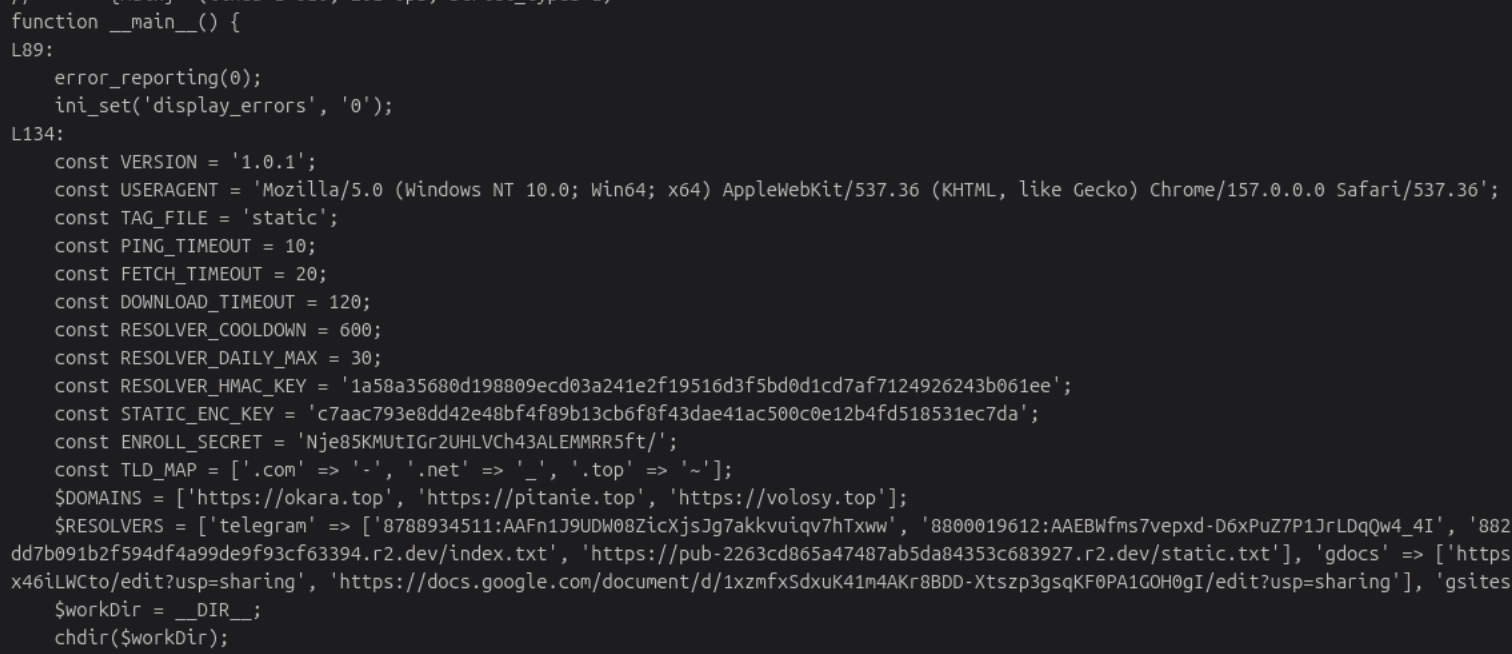
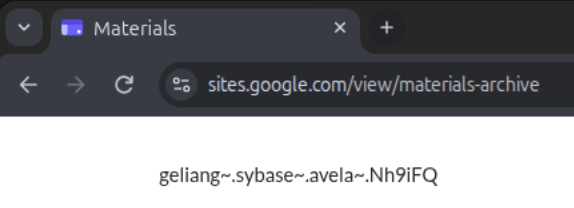
More domains can even be obtained through Telegram bots or Google pages, just like in 2024, with two differences: the list now also includes files hosted on Cloudflare R2, and the messages are authenticated. The loader reads the description of a Telegram bot, or the description of a Google Docs or Google Sites page, and expects a short string such as:
geliang~.sybase~.avela~.Nh9iFQ
Each token is a domain name whose last character encodes the top-level domain ("~" stands for .top, "-" for .com and "_" for .net), and the last part is a short authentication code (a truncated HMAC-SHA256) computed with a key that is hardcoded in the malware. During our analysis, this exact message was published on several of the pages, pointing the bots to three new C2 domains.
A task received from the server consists of an action name, a URL, and a file name. The server also decides which installation can execute tasks, as every response carries an identifier that must match the installation folder of the bot. In other words, the decision that used to be made by the anti-sandbox logic in the JavaScript and PHP files can now be made by the C2 server, where analysts can no longer read it.
The next stage: SYS010 takes over browsers through trusted management features
During our analysis, the C2 server answered with the following task:
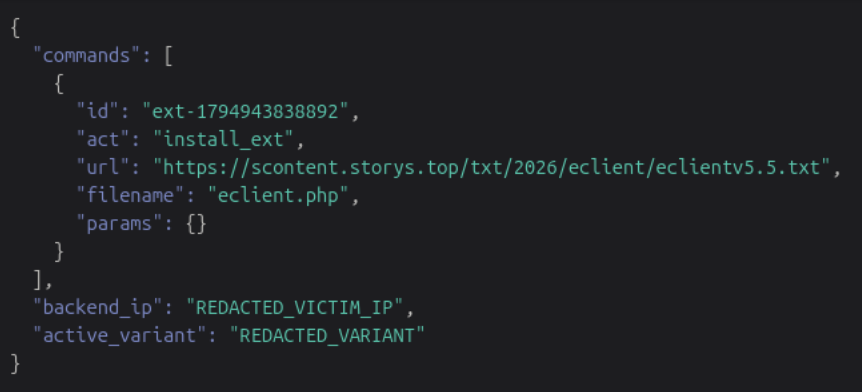
The downloaded file, eclient.php, is another SourceGuardian-encoded script, protected with the same encoder license as the loader. Despite the name of the task, it does not contain a browser extension. Its job is to make the browsers installed on the machine install one by themselves:
- Google Chrome – The script writes an enrollment token into the registry (CloudManagementEnrollmentToken). At the next start, Chrome enrolls into a Google admin console controlled by the attackers, as if it belonged to a company, and can then receive its list of mandatory extensions from the cloud.
- Mozilla Firefox – The script writes an ExtensionSettings policy that forces the installation of an add-on from a URL chosen by the attackers. It also disables the Developer Tools and the option to report an extension for abuse.
- Microsoft Edge – On Windows computers that are not managed by an organization, Edge only force-installs extensions from its own store. If the C2 server allows it for that victim, the script turns the computer into a managed one, by enrolling Windows into an MDM server operated by the threat actors.
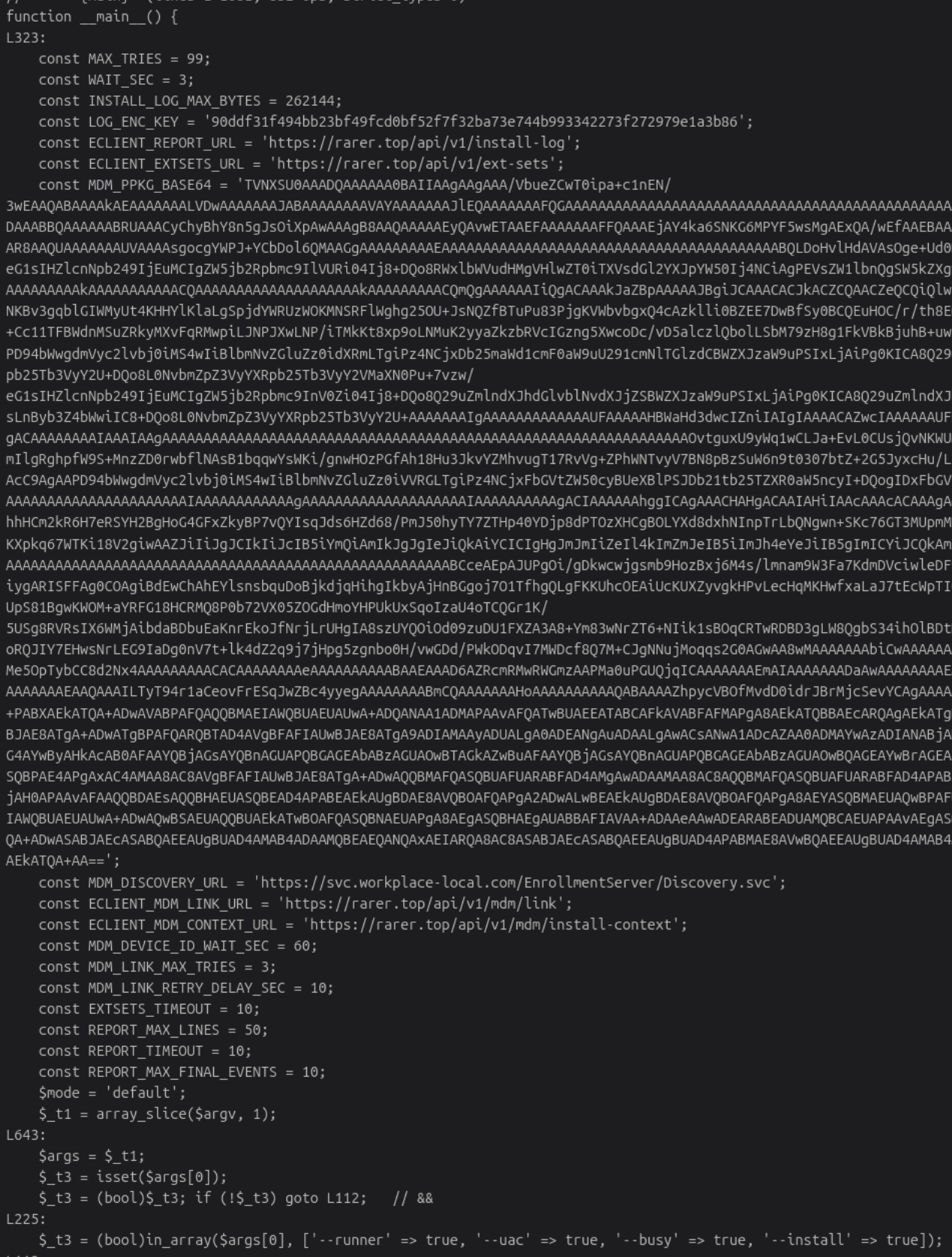
For all three browsers, the script also writes the machine ID and the token of the bot into the "managed storage" of the extension, so that the extension can later identify itself to the attackers.
Writing these settings requires administrator rights. The script solves this problem the simple way: it displays a User Account Control (UAC) prompt for PowerShell and, if the user declines, it asks again every three seconds, up to 99 times.
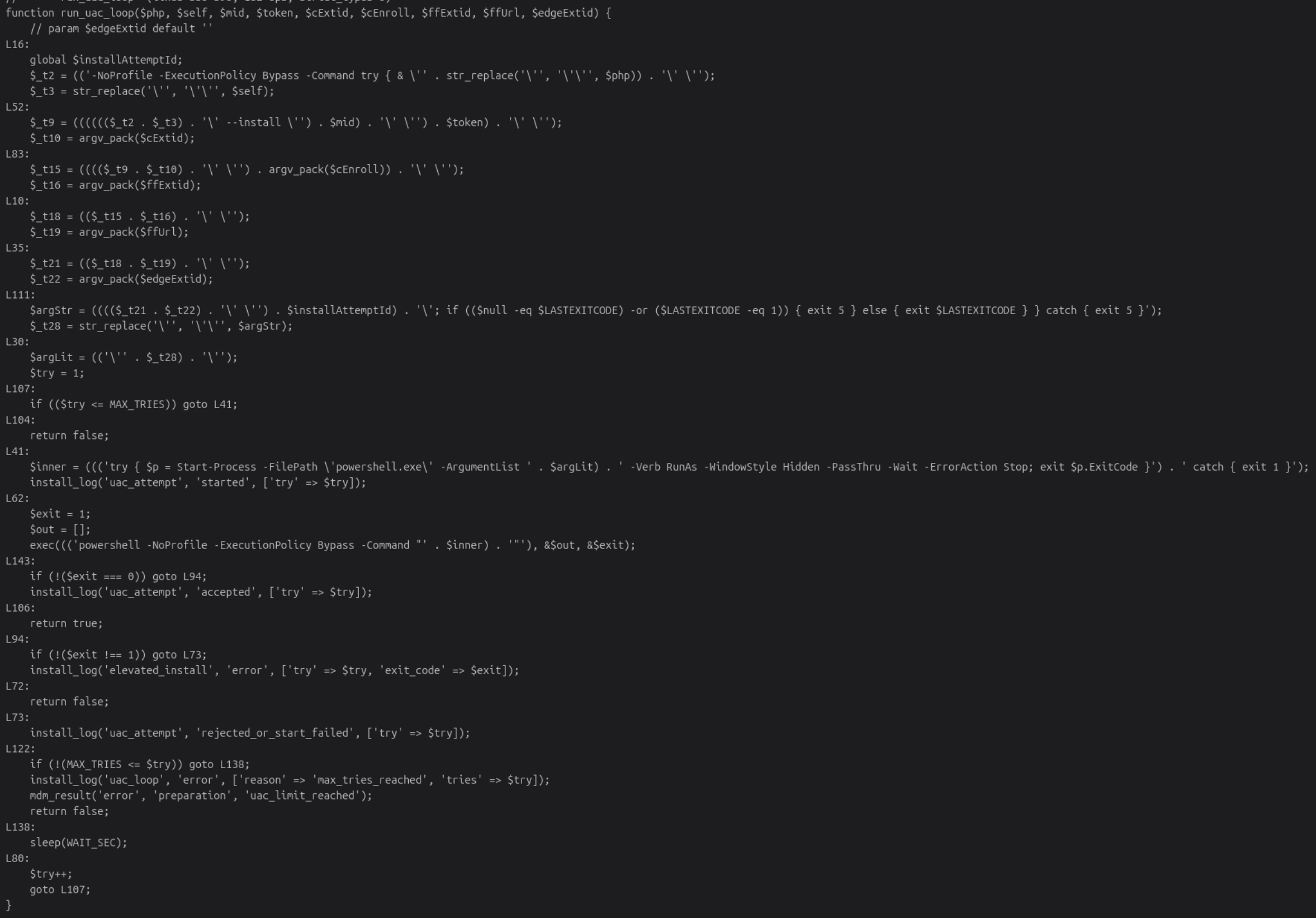
The identifiers of the extensions, the Chrome enrollment token and the URL of the Firefox add-on are not hardcoded. They are requested from another server (rarer[.]top), which allows the threat actors to assign different extensions to different victims.
The malicious extensions steal cookies and Meta Business data
The add-on delivered to Firefox is called "Document Hub" (version 2.1.20) and claims to "Keep your documents organized and accessible." Apart from a toolbar icon, it has no user interface. The package carries a valid signature issued by the add-on signing service of Mozilla on October 16, 2026, and the same code contains support for Chrome and Edge.
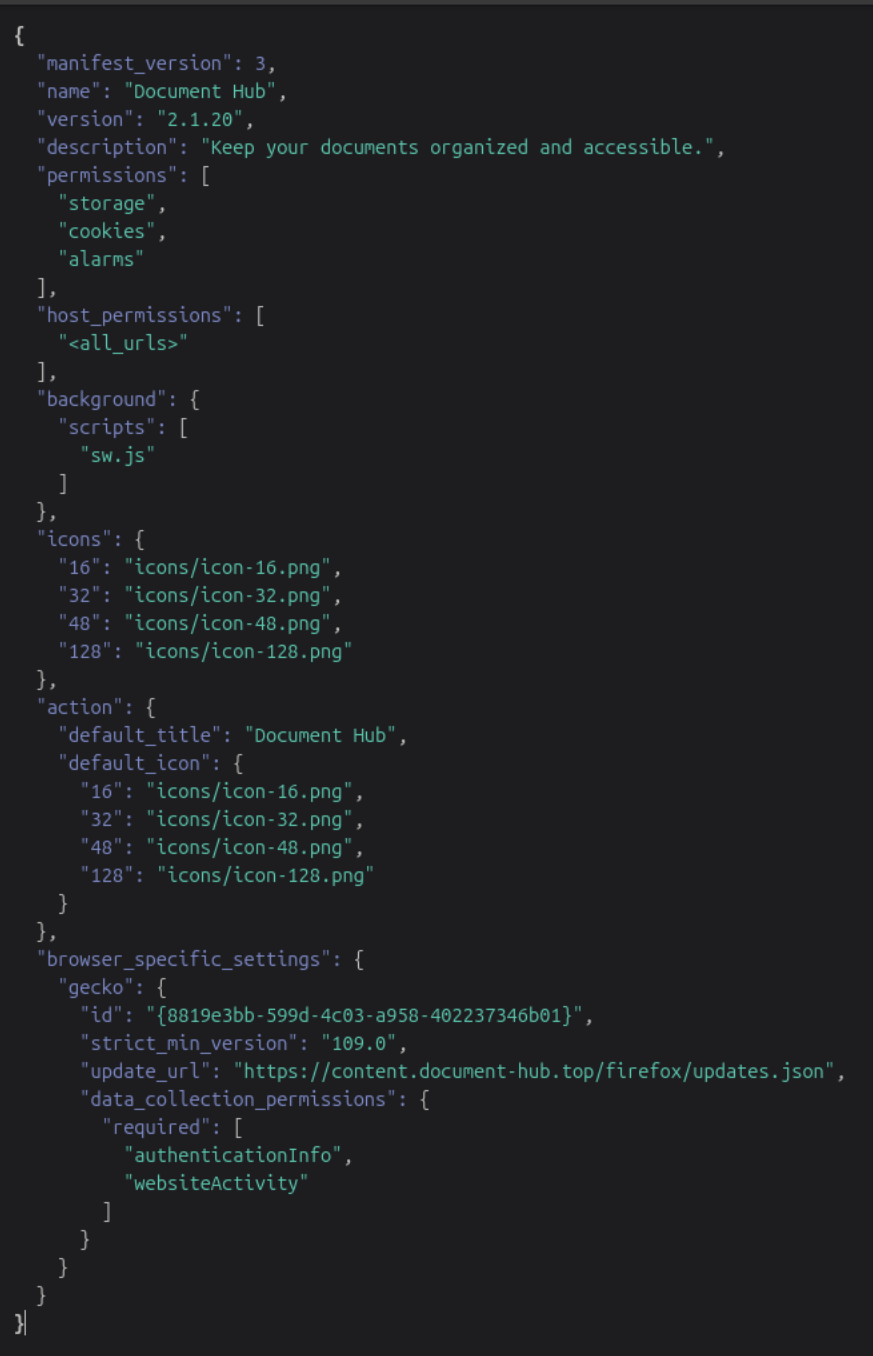
The reason it could pass as harmless is simple: the extension does nothing unless it finds, in its managed storage, the identity written by eclient.php. On an infected machine, however, it reveals its true purpose:
- Contact attacker-controlled servers every five minutes by default;
- When the server requests it, it reads and uploads cookies stored in the browser, across websites. With these cookies, the attackers can take over the sessions of the victim without knowing any password and without being stopped by two-factor authentication;
- If the victim is logged into Facebook, the extension uses the existing session to obtain an access token and then queries the Meta Graph API for the ad accounts, Business Managers and pages that the victim can access, including spending and payment details.
Interestingly, the Facebook-specific details (which page to load, how to extract the token, which API calls to make) are not part of the extension. They are downloaded from the server in a digitally signed configuration file, which keeps the code of the extension generic. During our analysis, the configuration returned by the server also contained the addresses of Gmail and Outlook, which the Firefox version simply ignores. The reason became clear once we looked at the Chrome version.
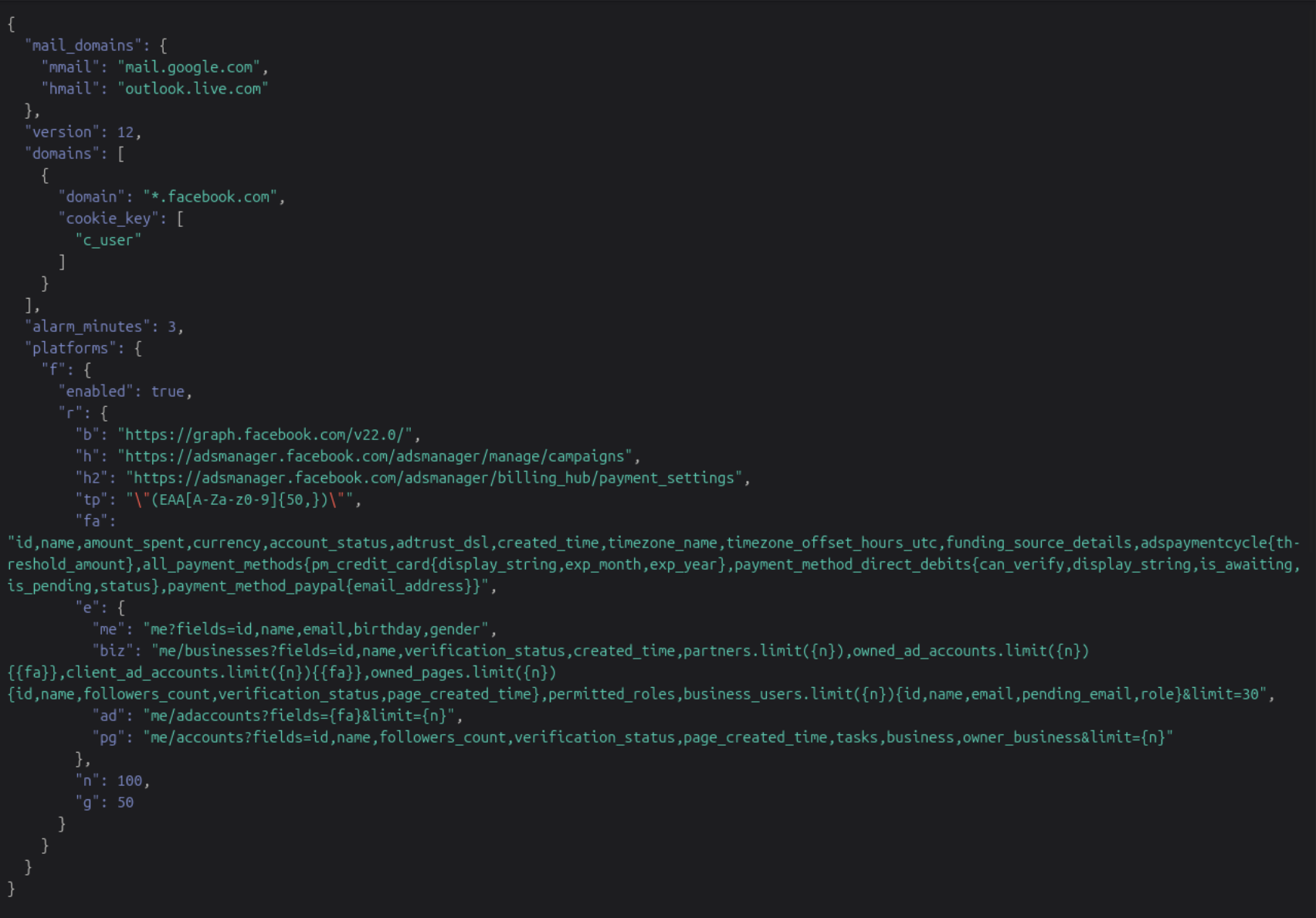
The extension has its own way of finding new servers. Similar to the PHP loader, it can read the description of Telegram bots and files hosted on Cloudflare R2, but the messages are signed with ECDSA and only the public key is included in the extension. During our analysis, one of the Telegram bots returned a signed list with three new domains: esora[.]top, merio[.]top and dnow[.]top.
It’s clear that the infostealer's core functionality is the same as in 2024: gathering information about Facebook accounts, especially business pages and ad accounts, that could be used in malicious activity.
The Chrome extension can read and delete emails
The Chrome version of the extension is called “Docs Helper” (version 1.0.25) and claims to be “A convenient extension to enhance your document experience.” Its icon imitates the Google Docs logo. It is not available through the Chrome Web Store. Instead, it is hosted on an attacker-controlled website (static.docs-helper[.]top) and installed through the attackers’ Google admin console.
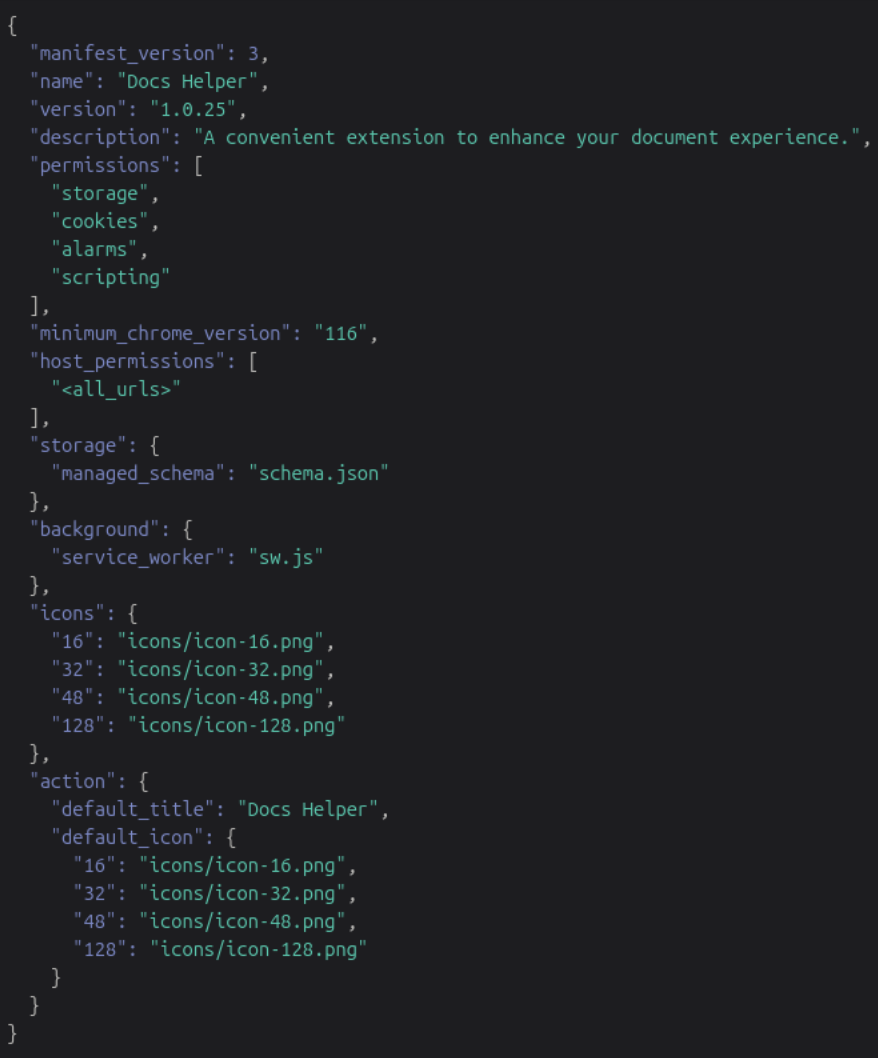
The Chrome version communicates with the same C2 servers as the Firefox add-on, uses the same Telegram bots and signing keys, and steals cookies and Facebook data in the same way. This time, however, the code is obfuscated, and the extension asks for one more permission that gives away what is new: the ability to run scripts inside web pages.
Inside the extension, we also find the names of all .php scripts potentially used by the attackers: bootstrap.php, base.php, base-no-comment.php, index.php, updater.php, u.php, eclient.php, esync.php, esync_cold.php, esync_old_with_enable_cr_update.php, e_sync_ext_only_prod.php, fingerprint_collect.php, sign_payload.php, encrypt_tag.php.
That ‘scripting’ permission powers a module that gives the attackers remote access to the victim’s email inbox. It supports Gmail and Outlook on the web and works as follows:
- The extension keeps a connection open to its C2 server and waits for tasks, but only during a time window opened by the server, which means the attackers decide when, and for whom, the module is active;
- A task can ask for the list of email accounts logged into the browser, or for the most recent messages from one of them, up to 50 at a time, including the ones in the Spam folder;
- To read the messages, the extension borrows the session of the victim. For Gmail, it injects a script into an open Gmail tab, or into a new tab opened in the background, and captures the security tokens that the page uses for its own requests. For Outlook, it captures the authorization headers of the web app and then queries the mailbox directly;
- The subject, the sender and the full text of every message are uploaded to the C2 server;
- The server can then answer with a list of messages to delete, and the extension erases them permanently: in Gmail they are moved to the Trash and then removed from it, and in Outlook they are deleted without passing through the Deleted Items folder.
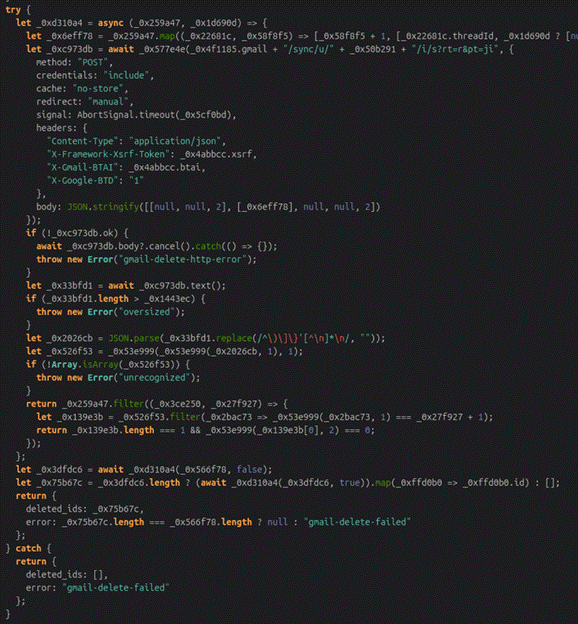
The attackers clearly put effort into staying unnoticed. A task can wait until no Chrome window is in focus, in other words until the user is not looking at the browser, and the tabs opened by the extension can be closed when the task is done. The scripts that read the emails are not declared in the manifest of the extension; they are injected only for the duration of a task and removed afterwards.
According to the data models found in the extension, the operators select the messages to delete by sender and by how recently they arrived. This matches exactly the security alerts and login codes that Facebook and other services send when someone accesses an account from a new device: the attackers can read the code, use it, and then erase the evidence before the victim ever sees it. And since password reset links and warnings usually go to the same inbox, a victim whose email is in the hands of the attackers will have a much harder time taking back the stolen accounts.
Evasion tactics
The adaptability of the cybercriminals behind these attacks makes this campaign especially dangerous. Compared to 2024, they rely less on hiding from sandboxes on the victim’s machine and more on never exposing the valuable parts of the operation:
- The infostealer is not part of the downloaded package. It is delivered only after the server selects a victim, and the backend models mention hardware fingerprints and blocklists that can be used to filter out analysts;
- The executable that the user runs is a legitimately signed application, and every build uses a different folder name, a different archive password and freshly encoded PHP files;
- The infostealer reaches the browser through trusted channels: the cloud management service of Chrome, a Mozilla-signed add-on and the device management features of Windows. No malicious process ever downloads it;
- An extension installed this way cannot be removed or disabled by the user. In Firefox, the Developer Tools and the abuse reporting option are turned off, while in Chrome, Safe Browsing is disabled and the management notice on the New Tab page is hidden;
- The Chrome version is obfuscated, injects its email-reading scripts only while a task is running and can wait until the user is not looking at the browser.
The three builds we analyzed were assembled within three weeks of each other, each with freshly encoded PHP files. When cybersecurity firms begin to flag and block a specific version of the loader, the hackers can respond swiftly by updating the code and pushing out new ads with updated malware, and, as we have seen, they can replace their C2 domains without touching the infected machines.
Why Bitdefender Labs links this campaign to SYS01
Bitdefender Labs assesses that SYS010 is likely a continuation and second major version of the SYS01 operation, although its individual stages have been substantially rebuilt. Our assessment is based on several similarities:
- The same delivery skeleton: Meta ads, a .zip archive with an Electron application, a password-protected archive extracted by standalone 7zip and a bundled PHP interpreter;
- The same persistence design: one PHP script that creates two scheduled tasks, one that runs every few minutes and one that runs at logon and executes both scripts;
- The same infrastructure habits: C2 domains mostly registered under the .top TLD, with new domains published through Telegram bots and Google pages;
- The new loader looks for a machine ID in %LOCALAPPDATA%\Packages\m.txt before generating a new one, the file in which earlier SYS01 versions stored their machine ID according to public reports, and the backend of the operators keeps track of an older PHP application next to the new one, while its data models still describe the old check-in request with the same parameters (a, v, machine_id, from and tag) that public reports documented for SYS01;
- The same goal: Facebook ad accounts and Business Managers.
Besides the Vietnamese messages mentioned above, the builder of the Electron application contains an error message written in Vietnamese, and the timestamps of all the analyzed archives indicate a build machine set to the UTC+7 time zone. Previous research from the security community has also linked SYS01 and similar infostealers that target Facebook to Vietnamese-speaking threat actors. These artifacts show the language and the clock of the developers; they do not, by themselves, identify the people who run the campaign.
Why Meta Business accounts are valuable
A compromised Meta Business account can help a malicious campaign grow.
With access to a legitimate ad account, attackers may be able to create and pay for new malicious advertisements from a trusted business identity. This makes the ads more convincing and can help them reach more people without creating new accounts from scratch.
The backend models identified in SYS010 suggest that stolen accounts can be checked, sorted by advertising budget and payment method, then marked as used in campaigns.
For a small business, the impact can be immediate:
- Unrecognized advertising charges
- Loss of control over a Facebook Page or Instagram account
- Fraudulent ads sent from a trusted business account
- Exposure of customer conversations or campaign data
- Disrupted customer support and marketing activity
- Reputational harm if customers see harmful or misleading ads from a familiar brand
Why creators should pay attention too
Creators are businesses, even when they work alone.
Many use professional Instagram accounts, Facebook Pages, ad accounts or Meta Business tools to promote content, work with brands, answer follower messages and manage paid campaigns. They may also use the same browser for editing tools, sponsorship emails, affiliate platforms and payment services.
A compromised browser session can put much more than a social-media profile at risk. Someone who gains access may be able to run unauthorized ads, misuse a payment method, read messages with followers or brand contacts, and use a trusted account to promote harmful links or fake giveaways.
Creators are also frequently targeted with offers for editing tools, templates, analytics apps, free assets and “must-have” software. A polished social-media ad can make an unsafe download feel like a useful shortcut. That is exactly why software should always come from the official source, not from an ad or unfamiliar download page.
How small businesses and creators can stay safe
You don’t need a dedicated IT team to make meaningful improvements. A few clear habits can reduce the likelihood that a social-media ad turns into an account takeover.
Download software only from the official source
Never download software, browser tools, design templates or productivity apps from a social-media ad, even if the ad looks polished or carries a familiar logo.
If you see an app you want to try, search for its official website independently, type the address into your browser or use a trusted app store. Avoid downloads delivered through ZIP archives, file-sharing services or unfamiliar websites.
Add a browser layer that can stop dangerous download pages
A convincing ad can still lead to a harmful website, even when the download looks like a legitimate app. Bitdefender Web Sage detected and blocked the SYS010 download page used to distribute the malicious Wallpaper_Engine.zip archive before the file could be downloaded.
Bitdefender Web Sage adds a layer of protection while you browse, helping block dangerous pages that may attempt to deliver harmful software, collect personal information or operate without your consent. It is particularly useful for small businesses and creators who regularly search for editing tools, templates, plugins and other resources online.
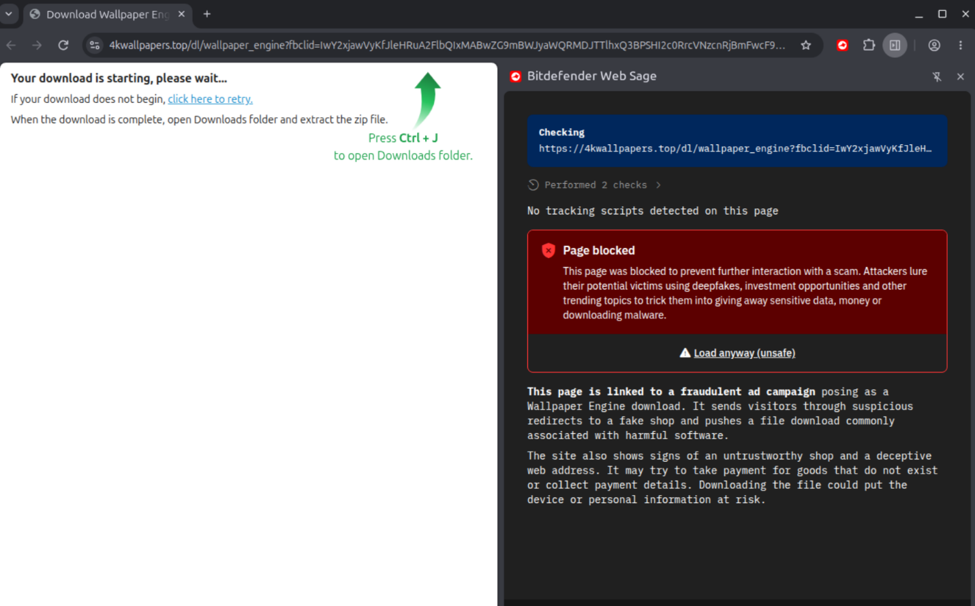
Bitdefender Web Sage blocks the SYS010 download page used to distribute the malicious wallpaper application.
Treat repeated administrator prompts as a warning sign
A legitimate application should not repeatedly pressure you to grant administrator access.
If Windows shows a User Account Control prompt and you do not fully understand why the program needs elevated permissions, cancel it. Do not keep clicking “Yes” simply because the prompt returns.
Review access to your Meta assets
Keep the number of people with administrator access as small as possible. Remove former employees, agencies or collaborators who no longer need access.
Review your Meta Business settings regularly for:
- Unrecognized people, partners or connected assets
- New ad accounts or Pages
- Changed payment methods
- Unexpected ads, campaigns or spending
- Login alerts you did not expect
Use separate roles for people who only need to create content, moderate comments or review messages. Not everyone needs full admin access.
Protect the email tied to your business or creator accounts
The email account connected to your Meta assets is a recovery channel, so it deserves extra protection.
Use a unique, strong password and multi-factor authentication. Review active sessions and recovery details. If someone suddenly cannot find account alerts, verification emails or password-reset messages, investigate promptly rather than assuming the emails were delayed.
Check whether your browser is unexpectedly managed
If Chrome, Edge or Firefox says that it is “managed by your organization” on a personal or small-business computer, do not ignore it.
For a device genuinely managed by your organization or IT provider, verify the setting with the person responsible. If the message is unexpected, treat it as a possible sign of compromise and ask a trusted IT professional or security provider to investigate.
Use security protection on every device used for work
A business or creator account can be compromised from a personal laptop just as easily as from an office computer. Make sure every device used to manage ads, customer messages, payments or business email is protected and kept up to date.
Bitdefender Security for Creators helps protect the devices and online accounts creators depend on for their work. Bitdefender Ultimate Small Business Security adds protection for small teams and businesses managing customer data, payments and business accounts.
If an ad, download page or message feels suspicious, use Scamio for a second opinion. You can send a link, screenshot, message or QR code for analysis before clicking or downloading.
Indicators of Compromise
Malware Hosting Domains
- hxxps://wallpapersengine.com (domain promoted in advertisements)
- hxxps://gover.top (download host)
- hxxps://wallpapers.top (domain promoted in advertisements)
- hxxps://upfiles.top (download host)
- hxxps://4kwallpapers.top
- hxxps://wallpaper-engine.pro
- hxxps://pcsofts.site
- hxxps://scontent.storys.top
- hxxps://content.document-hub.top
- hxxps://static.docs-helper.top
- hxxps://best-pc-softs.top (backend of the decoy application)
- hxxps://cdn.static-contents.com (media used by the decoy application)
- hxxps://cdn.httplivelywallpaper.app (media used by the decoy application)
C2 Domains (PHP loader)
- hxxps://shashen.top
- hxxps://okara.top
- hxxps://pitanie.top
- hxxps://volosy.top
- hxxps://geliang.top
- hxxps://sybase.top
- hxxps://avela.top
- hxxps://bmap.top
- hxxps://keshen.top
- hxxps://grosir.top
C2 Domains (installer module and MDM)
- hxxps://rarer.top
- hxxps://svc.workplace-local.com
- schools-account.com (domain of the Google admin console that manages the enrolled browsers)
C2 Domains (browser extension)
- hxxps://lelebag.com
- hxxps://porugo.com
- hxxps://openmagic.net
- hxxps://esora.top
- hxxps://merio.top
- hxxps://dnow.top
Malicious Browser Extensions:
- Chrome: ikpkhjechdnnfjedponpfmigmgcjgabi (Docs Helper 1.0.25)
- Edge: pmhmgkohdaacioooendcjcibkefifjja
- Firefox: {8819e3bb-599d-4c03-a958-402237346b01} (Document Hub 2.1.20)
Malicious Files:
- 419F95A427116725E8EB691A53AFACAF71CA023139B3F78D51EDF66D332B5EC9 (Wallpaper_Engine.zip)
- 3D155FB874CBEF9BF44CFF125520A437E791E6FAF33EFB9F5937097A99F6D31E (Wallpaper_Engine.zip, different build)
- A1E3C512E1B8036D3C2FD2CC7BBEFAD7B2919000BE169DB110F1E32E8A085201 (Live_Wallpapers.zip)
- 5f5f2d9a34e03dc59530173a1315c344dc690acee3cd7a65c3ff72da65ca68a9 (document-hub-2.1.20.xpi - Firefox version of the extension)
- 92686BAC718B5853BC26ABEAFE3BD0D5A542060C94A8715E76DC1A62834F6691 (docs-helper-1.0.25.crx - Chrome version of the extension)
Disclaimer
This article is published for information and public-interest security research purposes only. It reflects Bitdefender’s technical analysis of the samples, infrastructure and publicly available data reviewed at the time of writing. This information may be incomplete and may change as further evidence becomes available. We will update this article if we learn of material new facts.
Bitdefender does not make any legal determination regarding the activities described in this article. The mention of any company, product, platform, brand, domain or individual does not constitute an accusation of illegal activity.
The campaign described in this research abuses or impersonates legitimate services and brands to make malicious ads, downloads and browser extensions appear trustworthy. None of the companies or brands mentioned in connection with these examples are associated with the campaign. Their names, logos and visual identity may have been used without authorization.
References to Meta, Facebook, Instagram, Google Chrome, Microsoft Edge, Mozilla Firefox, Gmail, Outlook, Telegram, Cloudflare, Wallpaper Engine, MeisterTask, 7-Zip and other products or services are used solely to identify the affected, imitated or abused technologies. Such references do not imply affiliation with, endorsement by or fault on the part of Bitdefender or the respective trademark owners. The research does not suggest that the legitimate products themselves are malicious.
The recommendations and indicators of compromise in this article are general guidance, not professional advice for a specific system or situation. Readers should assess their own environment and seek qualified assistance where appropriate. To the extent permitted by law, Bitdefender is not liable for actions taken or not taken based on this article.
tags
Author

I'm a software engineer with a passion for cybersecurity & digital privacy.
View all posts
You might also like
Bookmarks
